No more font or formatting problems after edits
Type your name, draw your signature, or take it from a photo. Then click where it goes.

A form signed with a typed signature.

Press Sign on the left. Choose Type and write your name — or Draw it with the mouse or a finger, or use a photo of your signature. Pick the ink: black, blue or red.
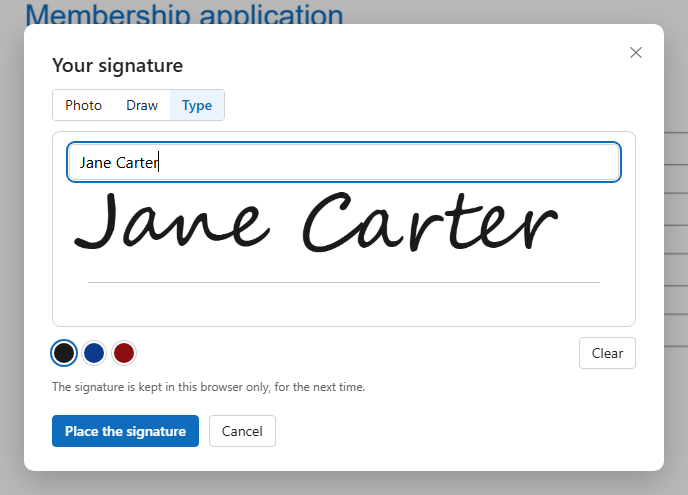
Press Place the signature, then click the signature line. To give it a size at once, drag a box instead.
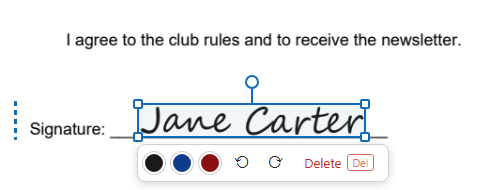
Drag it to move, a corner to resize, the round handle to turn it. Click elsewhere when it is right, and download.
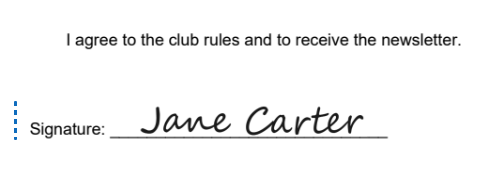
Your signature becomes a picture with a clear background, placed on the page like a stamp — the way a signed and scanned page would look, but crisp.

Typed in a handwriting style, drawn with the mouse, a pen or a finger, or taken from a photo of your signature on paper.
The background is clear: the signature sits on the line without a white box, over the text and the line under it.
The signature is kept in this browser only, so the next document is signed in two clicks. It is not sent anywhere to be stored.
Drag it, pull a corner, turn it by its handle (with Shift, in steps of 15°); change the ink colour at any time.
From a photo of it on paper — not a font that pretends.
Only the ink lands on the page.
Move, resize and turn it after placing.
Change the ink colour of a placed signature.
Draw with a finger, or take the photo with the phone.
Click each place; the signature stays ready.
This is a signature as on paper. It is not a digital (certificate) signature that proves who signed and locks the file.
The Change… button above the page opens the signature window again; the new signature replaces the kept one.
Put the signature over the field's line; the field itself does not need to be filled in.
For many everyday documents a signature image is accepted, as a scanned signed page would be. Where a qualified or certificate signature is required, this is not one.
In this browser only, so you can use it again. Clear it from the signature window, or with your browser's site data.
Yes: draw with a finger, or take a photo of your signature on paper.