No more font or formatting problems after edits
Pick where the numbers go and how they read. Every page is numbered at once.
“Page 1 of 2” at the foot of a merged document.
Press Strip on the left, then the numbers button above the thumbnails. Choose where the numbers go and how they read.
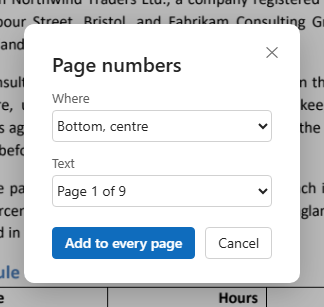
Press Add to every page. Every page gets its number.

The numbers are written on each page as text, in the margin you pick, without moving anything already there.

Bottom or top; left, centre or right.
1, 2, 3… · Page 1 · Page 1 of 9 · 1 / 9 — the total counted for you.
The page's own content is not changed; the numbers lie over it in the margin.
Numbering is one entry in the list of edits.
No page to forget.
“Page 1 of 9” counts for you.
Readers can find and copy the numbers.
Number the joined document as one.
Take them off with one step back.
In the browser, on a computer or a phone.
The old numbers stay. Pick another place, or change the old ones with Edit text.
Merge, delete and reorder the pages first, then number them.
Press Strip, then the page numbers button; choose the place and the format, and press Add to every page.
Yes: pick “Page 1 of 9” in the Text list; the total is counted for you.
Yes: undo, as long as the document is open.