No more font or formatting problems after edits

Redact a PDF

Drag over what must go. It is removed from the file, not just covered with a black box.

Choose a PDF

or drop it here · up to 20 MB and 50 pages

No file at hand? Try:InvoiceContract

How to redact a PDF

A customer's name blacked out on an invoice.

A frame is dragged over the customer's name and blacked out for good
  1. Mark what must go

    Press Redact on the left and drag over the text or picture. The frame snaps to the words it mostly covers, so you see exactly what will go. Mark as many areas as you need, on any page.
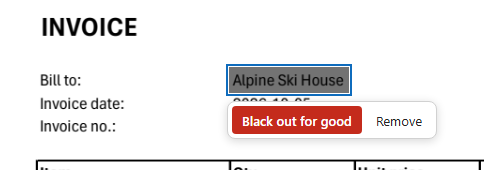
    A frame over the customer's name with Black out for good and Remove
  2. Black out for good

    Press Black out for good. Everything under the frames is taken out of the file, and a black box is put in its place.
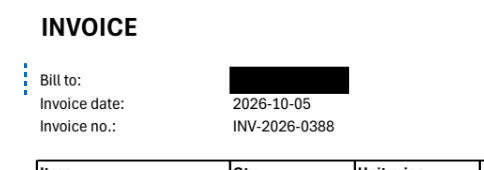
    A black box where the name was

How the text is removed

A black rectangle drawn over text hides it from the eye only: the words are still in the file, and anyone can copy them or lift the box. Many leaks happened exactly this way. Seamtype takes the words out.

A redacted name
  1. Removed from the file

    The letters and pictures under the frame are deleted from the page's content, so they cannot be selected, copied or found by search.

  2. What you see is what goes

    The frame snaps to the letters it mostly covers: a letter only touched by its edge stays, a word mostly under it goes whole.

  3. Nothing else changes

    After blacking out, the page is compared with the original outside the frames. If anything there would change, the page is left as it was and you are told.

  4. A black box in its place

    The box shows the reader that something was removed, as on a redacted paper document.

What you get

Really gone

Not in the file, not under the box.

Checked page

Nothing outside the frames changes.

Many areas at once

Mark them on any pages, black them out together.

Text and pictures

Names, numbers, signatures, photos.

Undo before you download

Every redaction is in the list of edits.

Nothing to install

In the browser, on a computer or a phone.

Good to know

Before you send it

After download, the removed text is not in the file. Until then you can still undo the redaction.

Scanned pages

On a scan the text is part of a picture: the picture's pixels under the frame are painted black in the picture itself, so nothing is left to recover.

When it cannot be done cleanly

Text inside an embedded block or a page that cannot be rewritten without changes is left as it was, and you are told why.

Questions

Why is a black box not enough to redact a PDF?

Because the text under the box stays in the file: it can be selected, copied and found by search. Redaction must remove it.

Can a redaction made here be undone by the reader?

No. The removed words are not in the downloaded file; there is nothing under the box.

Can I redact the same word everywhere?

Mark each place where it is; all marked areas are blacked out together.

Other tools