No more font or formatting problems after edits

Merge PDF files

Open one PDF, add the pages of another, and put them in the order you need.

Choose a PDF

or drop it here · up to 20 MB and 50 pages

No file at hand? Try:ContractInvoice

How to merge PDF files

An invoice added after a contract.

  1. Open the first PDF and the page strip

    Open the PDF and press Strip on the left: the pages are shown as a column of thumbnails.
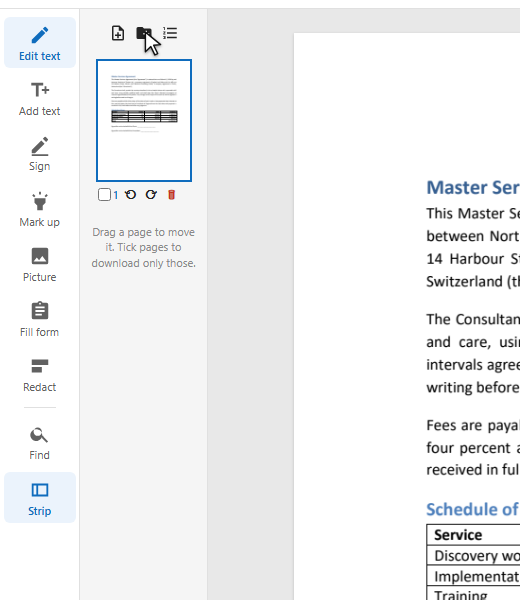
    The page strip with the button to add a PDF
  2. Add the other PDF

    Press the folder button above the thumbnails and choose the file — or drop it on the strip. Its pages go after the pages you ticked, or at the end.
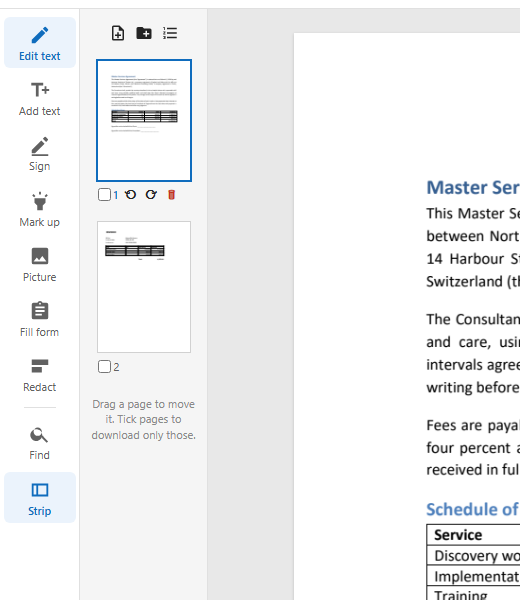
    The strip with the invoice's page after the contract
  3. Order and download

    Drag a thumbnail to move its page. Then download the merged PDF.

How the files are joined

The pages of the second file are copied into the first as they are: their text, fonts, pictures and links come along.

Two documents in one strip
  1. Pages as they were

    Nothing is converted or re-drawn: the added pages keep their text, fonts and pictures.

  2. Where you want them

    After the pages you tick in the strip, or at the end if none is ticked.

  3. Then everything else

    The merged document is edited like any other: text, signatures, page numbers.

  4. One step back

    Adding a file is one entry in the list of edits.

What you get

Any PDF

Add files one after another.

Drag to order

Move pages in the strip.

Nothing lost

Text stays text, fonts stay fonts.

Edit after merging

Number the pages, sign, change text.

Download part of it

Tick pages to download only those.

Nothing to install

In the browser, on a computer or a phone.

Good to know

Up to 50 pages

The browser editor keeps documents of up to 50 pages, all files together.

Password-protected files

A PDF that needs a password to open cannot be added here.

Page numbers

Number the merged pages with Page numbers after merging.

Questions

How do I combine two PDFs into one?

Open the first, press Strip, then the add-a-PDF button above the thumbnails, and choose the second. Download the result.

Can I put the second file in the middle?

Yes: tick the page it should follow, then add the file.

Can I change the order of pages after merging?

Yes: drag the thumbnails in the strip.

Other tools